
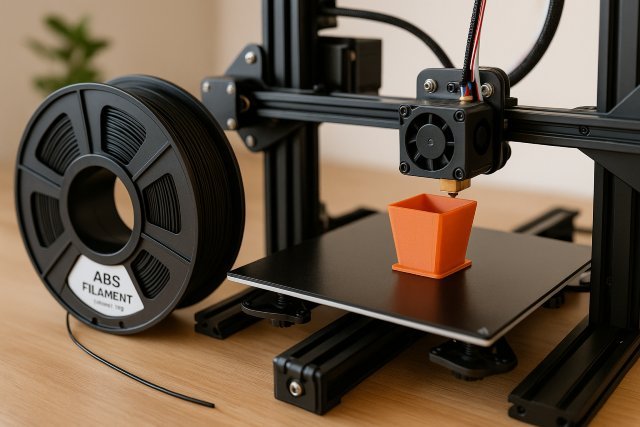
Understanding how to print with ABS filament can significantly improve the quality and durability of your 3D prints. ABS, also known as Acrylonitrile Butadiene Styrene, is one of the most popular thermoplastics in professional and hobbyist 3D printing. Known for its strength, heat resistance, and flexibility, ABS filament is ideal for engineering parts, enclosures, tools, and functional prototypes.
However, printing with ABS filament presents challenges such as warping, fumes, bed adhesion issues, and sensitivity to environmental temperatures. This guide breaks down everything you need to know to overcome those challenges and get professional-grade results from your ABS prints.
What Makes ABS Filament Unique?
ABS filament is widely used in manufacturing, automotive parts, consumer electronics, and toys such as LEGO bricks. Its high-temperature resistance and toughness make it superior to materials like PLA for functional components.
ABS handles stress exceptionally well, making it suitable for parts exposed to mechanical force or heat. According to research from 3D Printing Industry, ABS remains one of the top five most-used engineering materials in FDM printing because of its durability and reliability.
But to print with ABS filament successfully, you need to understand how it behaves inside and outside the printer, especially when it comes to temperature changes and environmental control.
Essential Settings for Printing with ABS Filament
Correct printer settings dramatically improve print quality when working with ABS filament. Since ABS contracts as it cools, maintaining temperature stability is critical to prevent warping and cracking.
Nozzle Temperature for ABS Filament
ABS filament typically prints at 220–260°C, depending on brand and formulation. Some engineering-grade ABS may require slightly higher temperatures. Always refer to the manufacturer’s recommendations, but most printers perform best near the midpoint of this range.
A properly heated nozzle ensures smooth extrusion, prevents clogs, and maintains consistent layer adhesion.
Bed Temperature and Adhesion
The heated bed is crucial when working with ABS filament. The ideal bed temperature is 90–110°C, which keeps the base layers warm enough to avoid rapid cooling. Uneven or insufficient bed heat leads to warping — one of the most common issues in ABS printing.
Many 3D printing experts recommend using adhesion helpers such as PEI sheets, ABS slurry, glue sticks, or build-surface tapes specifically designed for high-temperature printing. Keeping your first layer perfect is the foundation of a successful ABS print.
Enclosure Requirements for ABS Filament
One of the most important best practices is printing ABS in an enclosed 3D printer. ABS filament is highly sensitive to drafts, room temperature fluctuations, and cold air. An enclosure traps heat around the print, improving layer bonding and reducing warping.
Even hobbyists who don’t own an enclosed printer often create DIY enclosures using heat-resistant materials to stabilise print conditions.
Print Speed and Cooling for ABS Filament
ABS prefers moderate print speeds, typically between 40–60 mm/s, depending on your nozzle size and printer capabilities. Keeping the speed stable helps maintain consistent temperature throughout each layer.
Unlike PLA, cooling fans should be used sparingly when printing ABS. Many printers disable part cooling entirely for the first several layers to maintain adhesion and prevent cracking. Use minimal or no cooling for best results unless printing intricate overhangs.
How to Prevent Warping When Printing with ABS Filament
Warping is the number one challenge when learning how to print with ABS filament. Warping occurs when the bottom layers cool too quickly and pull upward from the build plate.
Control Ambient Temperature
Keep your printing environment warm and stable. Avoid open windows, running air conditioners, or drafts near the printer when using ABS filament. Temperature drops cause layer separation and curling.
Many enthusiasts keep the room around 25–30°C when printing large ABS models for added stability.
Optimise First Layer Settings
A perfect first layer is essential. Increase your first-layer extrusion width slightly and print slower to improve bed adhesion. A slightly squished first layer helps create a strong base for the rest of the print.
Using a brim can also help enlarge the contact area with the print bed, especially for large or complex parts.
Material Drying for ABS Filament
ABS absorbs moisture, which can lead to bubbling, weak prints, or poor layer adhesion. Dry your ABS filament in a filament dryer or a low-heat oven (40–50°C) for several hours if you notice popping sounds during printing.
Dry filament produces smoother extrusion and significantly reduces the risk of warping or cracking.
Applications and Use Cases for ABS Filament
ABS remains a favourite material among engineers, makers, and professionals because of its durability. Here are some of the most popular applications where ABS filament excels.
Functional Parts and Prototyping
ABS is ideal for mechanical components that need to withstand stress, strain, and heat. Its flexibility and impact resistance make it suitable for gears, brackets, mounts, tools, and structural prototypes.
Manufacturers often rely on ABS filament for rapid prototyping because it closely mimics injection-moulded plastic properties.
Automotive and Industrial Components
ABS is widely used in automotive housings, interior components, and machine parts. Its resistance to higher temperatures makes it safer than PLA in industrial or automotive settings.
Companies like Ford and BMW use ABS and ABS-based composites for tooling and prototyping, demonstrating its professional relevance.
Enclosures and Consumer Electronics
ABS filament is ideal for electronic casings, controllers, and custom enclosures. Its excellent insulating properties help protect internal circuitry from heat and impact. Hobbyists commonly use ABS to design and print custom electronics housings.
Troubleshooting Common ABS Filament Issues
Even experienced users encounter problems with ABS filament. The key is understanding how the material reacts under different conditions.
Layer Cracking or Separation
This typically happens because the print environment is too cool or the layer height is too high. Increase chamber temperature, reduce layer height, or increase nozzle temperature slightly to improve bonding.
Stringing and Oozing
ABS can produce stringing at high temperatures. Adjust your retraction settings, reduce print temperature, or enhance travel speed to minimise unwanted residue.
Elephant’s Foot or Bottom Layer Flare
This occurs when the bed temperature is too high or the nozzle squishes the first layer excessively. Lower bed temperature slightly or increase Z-offset to correct the issue.
FAQs About ABS Filament
What is the best temperature for printing ABS filament?
Most ABS prints best between 220–260°C, though this varies by brand.
Does ABS filament need an enclosure?
An enclosure is highly recommended to maintain consistent temperature and prevent warping.
Can ABS filament be used on all 3D printers?
Printers must support high nozzle and bed temperatures. Many entry-level models struggle with ABS unless upgraded.
Is ABS stronger than PLA?
Yes. ABS is more durable, flexible, and heat-resistant, making it suitable for functional and industrial parts.
Does ABS filament smell?
ABS releases fumes when heated. Proper ventilation or carbon filtration is recommended.
Conclusion: Mastering ABS Filament for High-Quality Prints
Learning to print with ABS filament unlocks a world of stronger, more durable, and heat-resistant parts. While ABS can be challenging — especially with warping, adhesion, and environmental sensitivity — the right settings and best practices can transform the printing experience. With proper temperatures, good bed adhesion, an enclosure, and well-dried material, ABS filament produces professional-grade results that outperform many other materials.
Whether you’re creating functional prototypes, automotive parts, or custom enclosures, mastering ABS filament helps you achieve prints that are strong, reliable, and built to last.